

2·
17 days agoThank you for adding your troubleshooting and solution to the thread. This is gonna turn into Wisdom of the Ancients eventually. ;-)
#nobridge
Thank you for adding your troubleshooting and solution to the thread. This is gonna turn into Wisdom of the Ancients eventually. ;-)
Check if you’re behind CGNAT
The allocated address block for CGNAT is 100.64.0.0/10, i.e. IP addresses from 100.64.0.0 to 100.127.255.255. If your routers WAN IP is one of those then selfhosting stuff accessible from outside requires a lot more work. Ask your ISP if you can have a public IP address and what the cost is or go into the rabbit hole of bypassing cgnat with a vps.
If you’re gonna host data, especially other peoples data*, learn and use the 3-2-1 backup strategy
For proxmox which I talk about more further down you can look into their own Proxmox backup server solution.
Data redundancy, either through BIOS/UEFI RAID1 (for two disks) or RAID10 (for four disks) or by running ZFS
This isn’t a backup, this is about being able to replace a faulty drive without downtime and having an easier rebuild process compared to restoring from backup.
Virtualization, for a beginner that already runs linux I would recommend Proxmox
This makes it more complicated to get started but easier to maintain the installation and easier to migrate it to new hardware.
It also allows you more room to learn by doing, that’s the bonus of the easier restore, cloning and snapshotting of virtual machines compared to bare metal.
*If you’re new to selfhosting then begin with yourself and having only local in-house access. As a step 2 learn how to setup a vpn for access from the outside. Step 3 would be learning how to use a reverse proxy, lets-encrypt and so on for SSL access without vpn.

The days are finally longer than the nights and I’m starting to see grass underneath the snow. I’m looking forward to start working in the vegetable garden and being able to have a nice cup of tea outside in the sun.
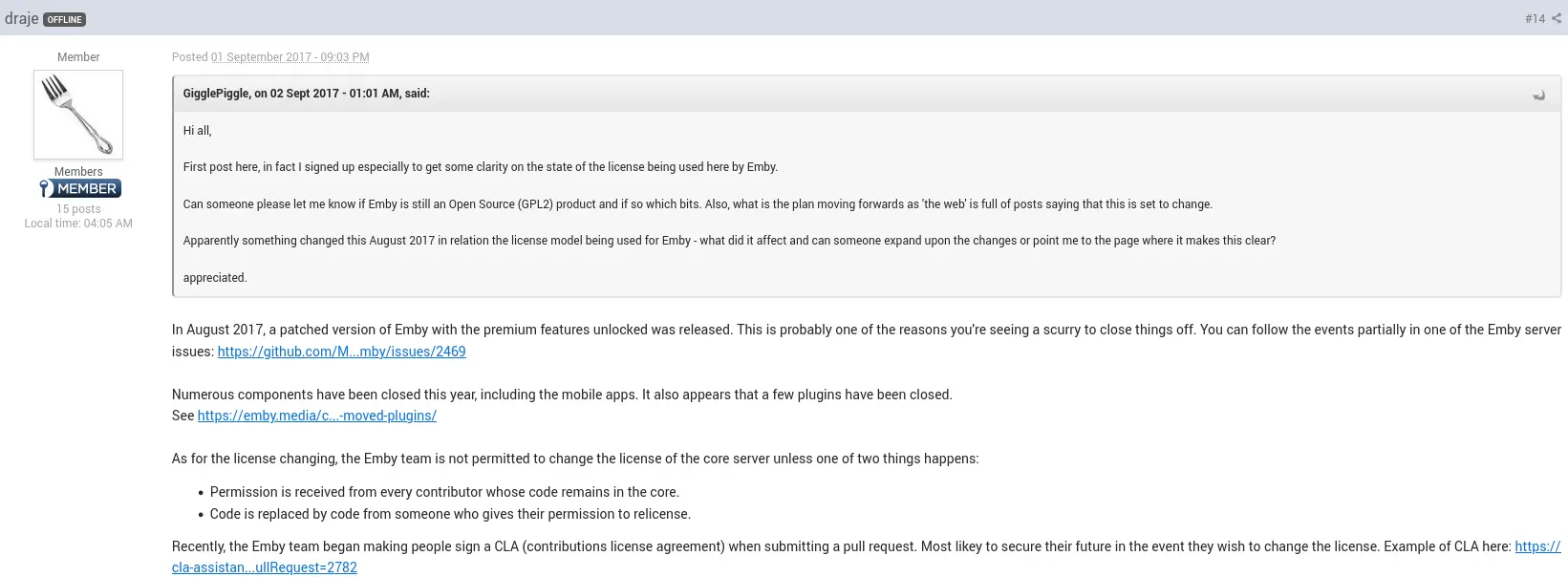
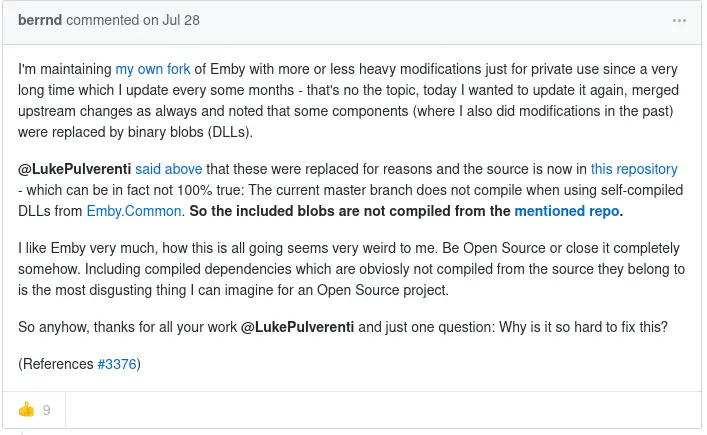
So the issue is kind of similar to bitwarden; how to protect the premium bits when having an open source core?
They just didn’t handle it as gracefully.
https://www.theregister.com/2024/11/04/bitwarden_gpls_password_manager/
Here’s the history regarding emby if you’re curious:
https://github.com/nvllsvm/emby-unlocked
Ah, that’s good to know!
My jellyfin server is only available over vpn (and locally) so I haven’t much looked into beefing up the security on the jellyfin server itself.
Yeah, the reverse proxy will need to be able to handle the network bandwidth of your video stream too.
https://en.wikipedia.org/wiki/Reverse_proxy
I imagine something like Ontrack will quote you at least $1000
If you consider the data worth that then I would go for one of the big known firms.
If not then I would start researching how to replace a pcb and risk losing the data.
Yeah, I’ve written some custom css to get some better wrapping of libraries and such.
There’s also the community themes worth looking into.
https://jellyfin.org/docs/general/clients/css-customization/#community-themes
The space inefficiency is definitely there.
I find that clients, such as Jellyfin, Moonlight and Signal, works just fine as flatpaks but with those three apps my /var/lib/flatpak/ lands on 6.4GB.
When I temporarily had Discord installed it grew to 6.7GB, so the inefficiency is frontloaded and lessens the more of them you use.
Just played a bunch of episodes on Fedora KDE (Flatpak from flathub, Jellyfin client v.1.11.1, Jellyfin server v.10.10.6) without any trouble.
I would go for a reverse proxy to get ssl running.
https://jellyfin.org/docs/general/networking/#running-jellyfin-behind-a-reverse-proxy
Handling users with forgotten passwords is, sadly, a manual chore for the administrator.
https://jellyfin.org/docs/general/server/users/adding-managing-users#profile
Ah, if you’re allergic to flatpaks and can’t convince your distribution to include it in their repository then you can always build it yourself - https://github.com/jellyfin/jellyfin-media-player
Or just use their web based client with a browser of your choice. :)
As I was curious, Findroid gives you an android client that allows offline mode and downloading/playing/removing movies from the client.
Seems Infuse Pro (paid) version also has support for it if you’re an iPhone user.
edit: I see the discussion regarding filesizes and I believe that Findroid is downloading the raw file in the background, so for those that wish for smaller transcoded versions in the cache it isn’t a solution. I don’t own any apple devices so can’t tell how Infuse handles it.
The default Jellyfin client isn’t great for audiobooks.
For Apple iOS you might wanna look at https://github.com/LeoKlaus/plappa
For Android I would look at https://github.com/advplyr/audiobookshelf
Personally I just download the audiobooks from Jellyfin and play it in https://f-droid.org/packages/com.prangesoftwaresolutions.audioanchor/
They too put a whole lot behind their subscription though
https://emby.media/support/articles/Premiere-Feature-Matrix.html
I mean, except for Tizen OS isn’t most available? You can find the client for Android, Android TV, Windows, Linux (Flatpak), macos, apple ios, and more.
https://jellyfin.org/downloads/clients/
I didn’t enjoy using Jellyfin for audiobooks, on my android I use the Jellyfin client to download the book I wanna listen to and then I use AudioAnchor for listening to it.
I haven’t used Plex myself but Jellyfin doesn’t create any kind of meta files in the library folders. If that is true for Plex as well then I don’t see why it would be a problem to point them at the same shared library.
I guess you need to get your own version of the swedish summer vacation.