Hi all,
I am running proxmox on a mini PC with a handful of services in my stack. I also run NPM in an LXC to reach my services through my domain name (service.domain.tld).
For my Arr related stuff, I use Usenet, and everything runs through a VPN.
I have three services which are public. Jellyfin, Seer and BookOrbit (for syncing Kobos).
Currently I have no security besides the built in login managers from the services, but I am considering setting up Authentik. I know I’m asking for trouble with my current set up.
I have elderly and extremely tech averse family members who live in two countries other than me, so tech support can be a challenge.
A lot of people suggest running a VPN, but it would be difficult for my family and I don’t know how to make it work syncing our Kobos with BookOrbit.
I’ve also seen some posts about tunneling to a VPS somewhere and users can connect to the VPS without a VPN.
I feel this question has been asked several times, and I tried searching here and on the internet in general, but my knowledge is not good enough to use the right terms and to get something that is idiot proof.
Any suggestions on best practices or links to guides you recommend would be much appreciated. Also, what EU based affordable VPS would you recommend?
Never call yourself an idiot. Not a good IT engineer? (Just saying, I don’t know you) That doesn’t make you stupid at all.
For whatever it is worth to you I’ve hardened my jellyfin docker compose this way. I’m obscuring some things in this that are local to my network.
The container is read only. It mounts the media read only. It should be fairly isolated from getting privileges it shouldn’t have. The only things lost in this setup are the ability to delete media from a jellyfin client (something I never do) and the ability to manipulate files directly stored with the media. I use bazarr for subtitles so don’t need jellyfin to download them and I don’t keep trickplay or any other jellyfin metadata related files alongside the media. I feel pretty confident with this that even if the jellyfin codebase had a serious 0 day that the worst I’d lose is metadata and server setup, and important config files I have backing up to another machine.
I’m sure there’s things I’ve overlooked with this setup so I’m very open to being told there’s a better way to do something.
services: jellyfin: image: jellyfin/jellyfin:latest container_name: jellyfin restart: unless-stopped mac_address: OBSCURED # see macvlan note below hostname: jellyfin user: ${PUID}:${PGID} group_add: - "992" # my render group id security_opt: - no-new-privileges:true cap_drop: - ALL read_only: true tmpfs: - /tmp:exec,nosuid,nodev # exec some plugins can write to /tmp, no-nosuid,nodev for security networks: macvlan: ipv4_address: OBSCURED healthcheck: test: [ "CMD", "curl", "-fsS", "http://127.0.0.1:8096/health" ] interval: 1m timeout: 10s retries: 3 start_period: 30s environment: - TZ=${TZ} - JELLYFIN_PublishedServerUrl=OBSCURED - JELLYFIN_DATA_DIR=/config/data # consolidates these dirs under /config, migrated from linuxserver.io setup - JELLYFIN_CONFIG_DIR=/config - JELLYFIN_LOG_DIR=/config/log - JELLYFIN_CACHE_DIR=/config/cache - HOME=/config volumes: - ./jellyfin:/config - ${MEDIA}:/media:ro devices: - /dev/dri/renderD128:/dev/dri/renderD128 # isolate to just the renderD128 device device_cgroup_rules: - 'c 226:128 rw' # further limits access for the renderD128 device networks: # I went with macvlan to preserve mdns for local discovery, otherwise you need to use host level networking macvlan: driver: macvlan driver_opts: parent: OBSCURED # Replace with host network interface name (find via: ip route | grep default) ipam: config: - subnet: OBSCURED/24 # Your local LAN network CIDR gateway: OBSCURED # Your local router IP addressNot sure why nobody here recommended netbird reverse proxies. It has crowdsec out of the box plus blocking/allowing ip ranges. On top of it, it also support pin or password based auth, so you can have 2 layers of auth.
But i haven’t hosted jellyfin yet, only opencloud and a couple others. Haven’t seen anybody pwning it based on the logs
at this point why not just use Pangolin ?
Netbird’s reverse proxy is still in beta and is free, so when it goes GA the pricing may change. Otherwise this is a great option.
Hmm, thats a good point.
It’s just something to keep in mind.
Tailscale is also a good option. Headscale will also be good for this once they finish the implementation.
Backup.
Update.
Don’t keep all in one place.
Update.
Don’t forget to backup.At least the backup part I think I got. I do local backups in the mini PC, which get replicated to my NAS, which get backedup to backblaze (encrypted, because my photos and documents are also backed up there)
So the public services are purely for private use, to sync your mobile devices? You can install Wireguard on Android, send them over there. Though for e-reader, since they are Kobos (basically Android), you can trick it to install the app. Or even another launcher/book reader.
Kobo uses its own OS, not Android unfortunately. But I just found a tailscale plugin for it, so will try that
Install Koreader. Then install the bookorbit plugin
It’s very easy and reversible. And its really good
Yeah, not “Android” like Amazons’ is not Android; all based on AOSP but not certified for Play Store. Or is it depending on the device in Kobo, do they use something else too? The ones i know (Leaf, Note) have the not-Android ROM.
Kobo runs a light linux software called NickelOS on an esp32 board. No android at all. No ability to instal apks. Its not even AOSP.
One can install a custom OS over top called KOreader which expands its usability and offers tons of community led plugins.
I hate our kobos. The app is shit. Total waste of money.
But this gives me hope. I’m going to play with this.
Just install koreader. It really saved my kobo purchase
I love my kobo precisely because there’s a huge community behind KOreader. Lots of YouTube tutorials, lots of flexibility. My kobo kept dying at like 50% battery and I just assumed it was a bad battery. Turns out NickelOS was trying to cache a book infinitely in the background so the battery calibration was wildly off because it never properly achieved a sleep state when powered down.
I left it sitting for a year and a half. Charged it for a full day to balance the cells, copy pasted the files needed for KOreader, changed a config file so that NickelOS would not cache items in hidden folders, and then threw all my epubs onto a hidden folder called “. books” and boom.
New life in my kobo. I use it daily now. Battery is accurate to 20% (then it sorta doesnt turn back on but whatever). Fair warning though because KOreader is so expansive that its a rabbit hole. UI takes getting used to but the customizability is huge and it runs more efficiently without bloat and you can even use LocalSend to wirelessly push epubs from any device that can run LocalSend to the Kobo so you never have to plug it in again.
I sync book progress from my Xteink X4 pro to my Kobo Clara HD using KOSync and have my own little KOSync instance running on my homelab (but you can just use the public instances if you want).
Issue:
Most clients we instruct on homeoffice usage with vpns are already unable to remember the workflow: VPN -> (wait until green for connected) -> open work app -> Do work -> close work app -> disconnect vpn.Now you also may not want to tunnel all traffic (if you don’t have a VPS with symmetric Gbit and unlimited traffic) so you’d need to set up split-tunneling and/or limit the apps allowed for the tunnel (works in android).
Honestly? It would be easier to set up a S2S split-tunnel VPN with wireguard on the relatives router.
You can just specify AllowedIPs in the wireguard client config to route only traffic to your services through the VPN, works great.
Yes. Split-tunneling…
But if you are really hardcore about restrictions and would need to update the profiles it will be a pita…
Scheduling stuff is annoying ;-;AllowedIPs is a client side restriction that can be ignored anyway, no real security benefit from not just putting your entire network there.
Can you ellaborate?
The user can just edit the wg conf file and remove the restriction where it can and cannot connect to.
The file is not a baked immutable binaryOh sorry I was thinking you were talking about something entirely different. Makes sense, and yes.
crowdsec is super easy to setup
Crowdsec is excellent. Also add per country block for inbound connections. If you expose the services to a few friends and family members limit inbound access to their country. Just remember to change the list when travelling abroad and coming back.
Tried to get it running with NginxProxyManager. Didn’t work. I’m probably part of “team idiot”.
That does not bode well for me then :p
Idiots of the world - unite!
This looks great. Would you say this would be anough security?
Hard to say. Set up countermeasures and intrusion detection (tripwires, fail2ban, and more) or you’ll probably never know.
The big thing is what you are guardian against. Scammers and port scanners you would be good but if your a corporation or someone a government goes after they can do so much more and use an unreleased vulnerability on you.
I run crowdsec thru Zoraxy and also set an allow list for countries that can connect, a very short list since it’s just 5 people. Also fail2ban and I run the paid security thru unify to try it out.
Is this better than CSF (Configserver)? The scope seems to be the same here unless I’m missing something.
I use Pangolin on a kinda cheap VPS on Hetzner (they’re now a bit too pricey), and route my services through Site Connectors (Newt, it’s called). Dealing with opening my firewall is a pain I don’t wanna think about, but Pangolin creates a websocket and can do NAT traversal from the Site Connector, so no swiss-cheesing your firewall.
It’s nice because you can contain different services with VLANs to further segment and protect your network, and each Site Connector can work for many services (if there’s no firewall rules restricting it/VLANs) or you can put a Site Connector on each server individually, if segmentation is important to you.
Is there a guide you can link?
Sure, https://pimylifeup.com/pangolin-linux/
But I have to say, the Pangolin Docs are quite good as well: https://docs.pangolin.net/self-host/quick-install
Thanks a lot! Thus actually looks doable and like it will fit my needs!
Awesome, good to hear. Just a reminder that I forgot when I sent that link: double-check the Tutorial, it might have slightly outdated information. But a few lessons I learned when setting it up:
Pangolin uses its own auth. You can use a OIDC provider if you like, but you have to set it up. I use TinyAuth in conjunction because I have so few users.
To bypass auth on Pangolin, you must disable it and it will appear “Unprotected”. This helps with mobile apps, which don’t know how to deal with third-party login screens, but it leaves the login screen of whatever server you’re running (like Jellyfin) accessible by everyone. So something more hardened as your OIDC provider at the frontend help. Although lots of apps, again like Jellyfin, don’t have native OIDC login.
The solution would be to route it with Private Resources, which are zero-trust connections. Great for a few people on your network, but it requires you setting up the Client app to access the Pangolin network. I’ve had issues with DNS on Android before, but your problems may vary.
If you have any more questions, let me know. I’ve been using Pangolin for only about a year, but I think I learned enough to help.
Get Jellyfin off the open internet. For family who’ll never install a VPN app, the setup that holds up is WireGuard on their router, or Tailscale on whatever TV box they use, set up before it ever ships to them. They never see it. If something has to stay public, CrowdSec plus Pocket-ID is a lot lighter than Authentik for three users. I’m building a home box that ships locked down like this by default, so I’m curious: which broke first for your family, remote access or the logins?
Jellyfin on the open internet is FINE.
Agreed.
Secure it properly and you wont be pwned instantly.
My setup:
WAN -> OPNsense -> CrowdSec on FW and docker server -> Traefik -> Authelia middleware -> Jellyfin.I also have a geoblock active on the Cloudflare domain and directly on my opnsense.
Most datacenter ASNs are also blocked. They don’t need to connect to me.Yes, first party apps are broken but the browser works good enough and if I meed it, I have a VPN for myself.
Relatives get web browser or I’ll consider a S2S VPN setup.
How would you handle a mother in law at a retirement community with a Roku and no access to the router that serves the condo?
Get a router/travel router and set it up as a gateway where it provides its own SSID for the Roku to connect to. Basically a bridge to the complex, where you can inject some software. A lot of the travel devices have baked in Wireguard+Tailnet support. iNet are generally good products.
@Klox This is exactly what I do in my RV. Easy, cheap, reliable.
Yeah that’s kinda my situation as well, but they have a firestick.
@Blue_Morpho @heyeddi
Something like tailscale could be the solutionThere’s no tailscale for Roku.
If you don’t mind I’d share my scenario with you, but I’m far from a professional myself, so in the same time I’m also asking any thought about my own approach.
For my public facing services (e.g. Nextcloud) I’ve created a separate VLAN which is completely isolated from the rest of the system, I’ve deployed an nginx LXC with Crowdsec/fail2ban, and opened very specific “pinhole” style firewall rules towards the service layer VLAN in OPNsense. I’ve also separated this service / app VLAN layer from the database layer (which is another VLAN with strict firewall rules and SSL). For authentication I use what the service offers natively, except for some cases of keycloak / hardware key.
Based on my research, this should be a solid baseline, but honestly noone more knowledgeable than myself has confirmed it, so take it with a grain of salt.
I personally have been getting away from Nextcloud, because I feel it tries to do to much and does not do any of it great, except maybe file storage. It is also has a lot of php in its coding, so I have other services replacing it, and because I do not yet have the money to replace my iOS devices with stuff that can run GrapheneOS or Linux I use smb for file sharing. I do have a inexpensive VPS that hosts my blog and off site backup and that same host hosts my email (easyDNS), everything else is held locally.
If you are running crowdsec I hope that everything other than your honeypot (on its private vLAN) is using something other than port 22 for ssh?
Hm. I don’t think I had the chance to notice Nextcloud’s caveats as I’m the only user. I’ve set it up along with a collabora and Talk high-performance backend on separate vm-s, but I have noone to talk to as I’m the only user. <hide-the-pain-harold.jpg>
Speaking of GrapheneOS I used it on my Pixel8 for a year as daily driver, and it is great for the peace of mind of the privacy-cautious user, but at some point I came to the conclusion, that I want my mobile phone to be a single convenience device and returned to stock Android (I don’t like it, but this was a point of friction between my life and my hobby). I tried to live with an old Motorola Razr, then a modern 4G feature phone, tried using multiple phones, phone with a custom rom, GrapheneOS, but then my paranoia got defeated by everyday convenience.
VPS-es are useful, I totally agree. I have two usecases where I needed something with a static IP, and those were the solution attached to my home network with wireguard tunnel. 1. cloud connector to GoCardless to handle token exchange to retrieve my bank transaction information into an internal DB, and 2. email-relay server, so my mailcow instance can communicate with the world, but I don’t have to deal with mail traffic through my own firewall. Yeah these VPS-es have custom SSH ports, no password login, no root login, as I remember I’ve set it up to accept ssh connection only from the wireguard tunnel and fail2ban hands out ban for even pinging these VPS-es (yes, I managed to lock myself out twice. :D ).
Are you blogging about your homelab? I’d take a look if you don’t mind sharing the link just out of curiosity.
I am fairly confident I am not going to grant anyone access to homelab I do not know.
Oh, that is totally understandable, I wouldn’t even ask for that. I thought it would be a publicly accessible technical blog about homelabs in general.
You can see my blog blog.reannlegge.ca sure but I am not going to show off all of my services in a library
There is some great advice in here but I wanted to throw my two cents in by saying bollocks to Hetzner, they get circlejerked far too much. Go with Contabo instead, 4 core 8GB VPS with 100GB SSD is $5 a month right now and has a generous 30TB/month bandwidth allowance.
Because you quoted in dollars I almost dismissed them for not being European, but then I saw they are German, but have servers all over the world. I’ll check them out, thanks.
Pangolin on a cheap VPS.
Ask yourself: is there any service that really, really needs to be public? Or is this only about availability for you or a very limited group (family, friends), which could be implemented via a VPN solution?
It’s just for family, but elderly family in two different very far away countries, across multiple devices.
WireGuard is stateless, so running it “on” 24/7 is cheap, set it up once for them and leave it on, ideally they wouldn’t notice a thing.
See that you get a solid VPN bridge, much better than trying to fix a ton of different services if things go awry.
I have three services which are public. Jellyfin, Seer and BookOrbit (for syncing Kobos).

don’t expose services to the internet. expose a proxy.
Imagine if your house had doors to the outside for every room in your house. not very secure, right?
I’m going to hope when you mentioned NPM you were referring to nginx proxy manager.
also, use a separate host for your proxy that is firewalled off from everything else on your network other than the host with your services and only on those specific ports. it doesn’t have to be powerful, just has to have a fast network connection. I wouldn’t use anything less than 1gbps. you could vlan as well, but that would require advanced routing or a second NIC for your services host. don’t forget to firewall your services host off the rest of your network.
finally, monitor the shit out of that proxy host. use SIEM tools like graylog, wazuh, splunk, etc. you cannot make an impenetrable fortress, it’s only a matter of time before you experience a penetration. setting up proper logging and alerting is imperative to securing your network.
Yes everything goes through nginx proxy manager and I only forward port 443 in my router.
I guess running NPM on a raspberryPi could work?
it should as long as it’s got that 1gbps Ethernet. 100mbps just won’t be enough for video streaming with jellyfin.
having it separate also allows you to patch routinely with minimal downtime.
Authentik (and other auth systems) are super heavy for single/low-user systems. They’re geared for more MSO use than SOHO. For auth, I’d really recommend something lighter, like Pocket-ID (as long as you don’t mind passkeys instead of passwords - Seerr and BookOrbit support WebAuthn so you can use it directly, and Jellyfin supports it with an extension for the web interface + you can set password for a Jellyfin account for clients that need direct auth). For any service that doesn’t support it, Pocket-ID has an auth gateway/wrapper you can use with your reverse proxy (I use Caddy, config is fairly straightforward).
For security, I’d recommend some automated IDP systems. You could run Suricata on your router (if it can host heavier apps), which is what Ubiquiti uses. It can talk to your firewall and set up rules on the fly to block intrusions, specific users etc.
Beyond that I’d also recommend crowdsec. One half is the detection (you hook it up as part of your reverse proxy, so it can inspect packets and full flows), and the other is the actioning (you hook it up with your router/gateway/firewall to apply blocking rules). Big benefit is that their open database (the free to access one) has all the 0-day fingerprints and CVE-specific behaviour is detected and blocked.
Here’s a quick preview of what it’s been doing today on my setup:
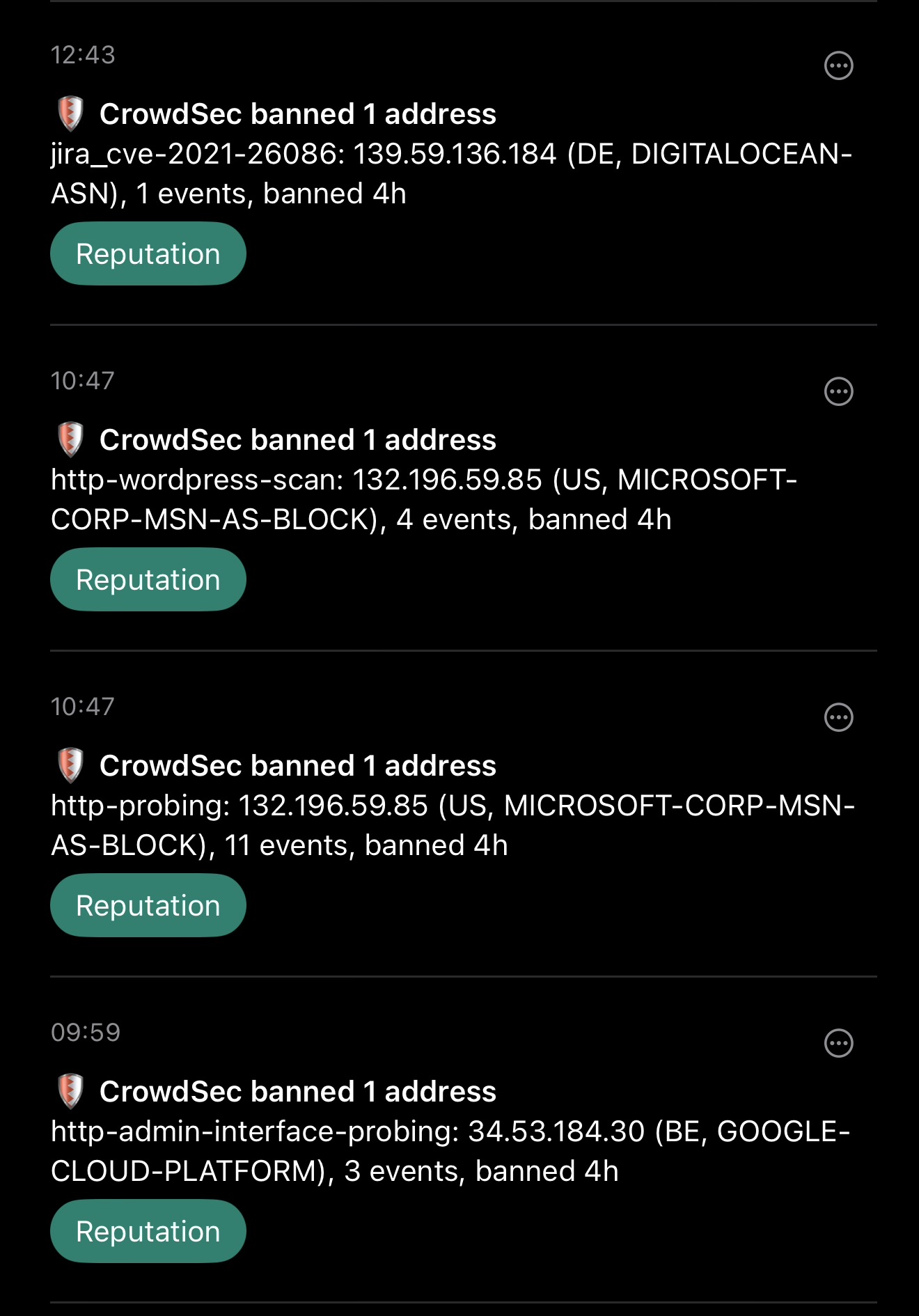
Since most indirect attackers (people randomly probing your homelab instead of directly targeting you and your services) will come from various data centers (routed through a VPS or directly relying on the infrastructure), a 4h block is generally enough to not interrupt other services while blocking attackers from probing once they hit a limit.
And of course you also need proper container network setups. For example, every single container I can, I run in rootless, read-only mode. This means the container itself can’t be edited - only a handful of paths (left as volume mount points) are RW: the config folder, media folders only if the container needs write access to them, and caches. Each path is mounted noexec so even if a backdoor is found into the container, the attacker can’t do much as they can’t execute anything they’d deliver as payload (can’t write to paths that are executable, can’t execute from writeable paths), and since the container is rootless, there aren’t many tools to run: no ash/bash/zsh/fish, no interactive shell at all, no operating system beyond a barebones Linux kernel and the bare minimum tooling needed for the specific software.
Docker networking is also hardened, with routing strictly limited, and containers only seeing other containers they need access to.
I’d also recommend using LLMs to expand on your security. No I’m not talking about giving Claude access to your entire network and homelab… But you can ask for general hardening guidance, and most frontier models will gladly walk through your stack using basic reporting (you run a command on the homelab nodes, it returns a report, you give that report to the model), and give recommendations on making it more secure.
I installed CrowdSec yesterday and I’m curious as to where that screenshot can be found so I can determine if things are working properly. Where can I find that? I have only a single alert from last night which I think is good, but I am wanting to make sure I have things set up correctly before I can breathe easily.
That screenshot is from ntfy - I hooked up the alerting from crowdsec (and a bunch of other things incl full logs from my servers, docker containers, APs and other network devices) into a tool I call Overseer. It is not yet public, so you can’t really get a screenshot like mine.
However, CrowdSec does offer a dashboard of your instance, incl prevented attacks list etc.
Thanks! I use a different app called Overseerr, but I think it’s pretty different than yours. 😂
Appreciate the info. I really want to make sure I didn’t only get half working and need to do more but looking at the crowdsec dashboard I think I’m good? I’ll have to do some more digging. Thanks again.
Great advice all throughout but especially on using LLMs to harden your security. The config it helped me complete for Crowdsec in days would have taken me months otherwise.
to get something that is idiot proof.
The problem with Jellyfin in particular is that it needs to support binary streaming protocols. You can implement some gateway/firewall-based security in front of Jellyfin, but in the end it is still Jellyfin’s internal mechanisms mostly responsible for its own security. I don’t use Authentik but I have read many good things. The only real “advantage” of it is that it forces your users to somewhat better credential handling. Jellyfin still only supports LDAP, so the users will have to enter their Authentik username and password – very similar to just local accounts managed by Jellyfin. So IMO, not offering you that much extra in terms of security. You will be better served by firewall tools like fail2ban, crowdsec, geo-fencing, etc.
Depending on where/how your users access Jellyfin you could have something a bit tighter. If they never run it on a TV you could do something more advanced like mTLS where you issue them a certificate with a TTL of several years, walk them through installing it on their phones/laptops, and then have that in a reverse proxy. But at that point you might as well walk them through setting up a VPN mesh network.
For Seerr, it’s just a standard web app .You could put a reverse proxy in front that requires OIDC with Authentik. Seerr is also pretty close to having native OIDC integration. Personally I prefer having two rounds of OIDC – reverse proxy really narrows what the public can see as a first layer.
For BookOrbit, I am not familiar enough with the Kobos. My guess is, you could put BookOrbit behind a reverse proxy that enforces OIDC, but you might have to allow a bypass for
/apiroute. Then you’re relying on BookOrbit to authenticate all/apirequests through API tokens. This would look like the normal Kobo linking process, so no real difference, but then your BookOrbit web UI is locked behind OIDC authentication.